





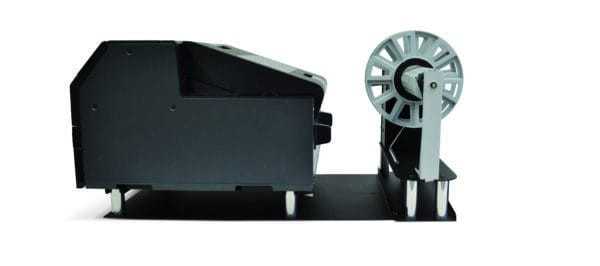


Epson CW-C6500P Label Unwinder, UW6500P
- $1,295.00 CAD
- $1,295.00 CAD
- Unit price
- per


Label Unwinder for Epson ColorWorks CW-C6500P Printer – 3" Core, Up to 10" OD
The UW6500P label unwinder is a practical media handling accessory designed for the Epson ColorWorks CW-C6500P. Built to support larger roll loading while also accommodating smaller rolls, this non-powered label unwinder helps businesses improve label handling efficiency, reduce roll change frequency, and create a more organized feed path into the printer. With support for 3" cores, up to 10" outer diameter, and media liner widths up to 8.66", UW6500P is a cost-effective option for operations that want better roll management and smoother day-to-day production workflows on wider Epson ColorWorks media setups.
Non-powered unwinding support for cleaner printer feeding
Designed for the Epson ColorWorks CW-C6500P platform
Helps reduce roll changes and improve production continuity
Overview
The UW6500P is a label unwinder built to improve how media is supplied into the printer during production. Rather than serving as printable label stock, this accessory supports the feeding stage of the workflow by holding the incoming roll in a more controlled way before media enters the printer path. For businesses running roll-fed color label jobs, that can help create a cleaner setup and reduce the inconvenience of managing heavy or larger rolls directly at the printer.
A major benefit of this design is the ability to use larger label rolls. Larger rolls can reduce the time spent replacing media, help lower handling interruptions during longer print runs, and contribute to a more efficient production rhythm. The UW6500P is also positioned as a practical option for smaller rolls, which adds flexibility for businesses running different label formats or moving between shorter and longer jobs without overcomplicating their media setup.
Because the UW6500P is a non-powered unwinder, it offers a simpler and more cost-conscious media management solution for operations that want better roll handling without moving into a more complex powered accessory system. For Epson ColorWorks users printing wider product labels, compliance labels, industrial packaging labels, or other commercial color jobs, this accessory can help support steadier input handling and a more organized production environment.
Technical Specifications
Core equipment details for buyers checking printer fit, media range, and label roll handling requirements.
| Specification | Details |
|---|---|
| Product Type | Label Unwinder / Media Handling Accessory |
| SKU | UW6500P |
| Designed For | Epson ColorWorks CW-C6500P |
| Supported Label Roll Diameter | Up to 10" OD (250 mm) |
| Supported Label Roll Core | 3" ID (76.2 mm) |
| Supported Media Liner Width | Up to 8.66" (220 mm) |
| Power Configuration | Non-powered |
| Workflow Function | Supports controlled unwinding of label rolls into the printer |
| Equipment Category | Label Finishing / Media Supply Equipment |
Compatibility
Designed specifically for the Epson ColorWorks CW-C6500P and wider roll-fed label workflows that benefit from controlled upstream media support.
The UW6500P is designed for use with the Epson ColorWorks CW-C6500P. That printer-specific fit matters because unwinders are not just about physical width. Real compatibility also depends on how the media is presented to the printer, how the roll is supported during feeding, and whether the core size, roll diameter, and liner width make sense for the intended production setup.
This model supports 3" cores, up to 10" OD, and media liner widths up to 8.66", making it suitable for broader Epson ColorWorks workflows where larger rolls can improve efficiency. Because it is a non-powered unwinder, it is especially useful for businesses that want a straightforward roll support solution without introducing a more complex powered system into the printing area.
Buyers should still confirm their overall media path, printer configuration, and roll format details before ordering. That is especially important when running specialty media, changing roll sizes, or trying to build a consistent production setup across printers, label stock, and finishing accessories.
Where does the UW6500P help in production?
A practical upstream media support accessory for businesses that want larger roll capability, cleaner feeding, and less disruption during label printing.
Common applications
- Color label workflows using larger incoming rolls
- Production environments looking to reduce roll replacement frequency
- Wider Epson ColorWorks media setups
- Packaging departments running repeat label jobs
- Operations that need more organized label roll feeding
- Commercial label production where incoming media control matters
- Businesses switching between larger and smaller compatible rolls
- Workflows where a simple, non-powered unwinding option is preferred
Workflow overview
An unwinder helps manage the incoming roll before printing begins. Instead of relying entirely on the printer to support the full supply roll in a less optimized way, an unwinder presents the media more cleanly and helps create a better feed path. This can improve operator convenience, reduce awkward roll handling, and support steadier workflow continuity during longer production periods.
The UW6500P is especially useful for businesses trying to gain the benefits of larger label rolls, such as lower changeover frequency, less downtime, and better use of space and labor during print runs. Those advantages can matter in environments producing product packaging labels, chemical drum labels, industrial supply labels, food and beverage labels, and other wider-format color applications where production efficiency is important.
If you are setting up a broader Epson workflow, you may also want to browse compatible CW-C6500 labels, explore color label printers, or review our product label printing service if you need finished labels without handling all printing internally.
Why do roll diameter, core size, and liner width matter on an unwinder?
Media handling accessories depend on physical roll geometry. The 3" inner core affects how the roll mounts onto the unwinder. The 10" maximum outer diameter determines how large a supply roll the unit can support. The 8.66" media liner width limit sets the usable range for incoming media. These dimensions are central to whether the accessory will actually fit the workflow it is being purchased for.
For buyers trying to reduce setup problems, checking these measurements is just as important as confirming printer model. A roll support accessory that does not match the real physical media format can introduce feeding inefficiencies, unnecessary operator frustration, or workflow inconsistency. Confirming the full media path helps reduce uncertainty before purchase.
ForeFront advantage
- Workflow-oriented guidance for printers, media, and accessories
- Commercial label expertise grounded in real business production needs
- Canada-focused supply support for in-house labeling operations
- Accessory ecosystem awareness across printer, media, and handling hardware
- Practical buying clarity for compatibility and production fit questions
Operational tips for better unwinding performance
Useful guidance for smoother label feeding and a more controlled printer setup.
- Confirm that the label roll uses a 3" core and falls within the UW6500P diameter and width limits before loading.
- Position the unwinder so the media path into the printer stays clean, straight, and free from unnecessary drag or twisting.
- When moving to larger rolls, run a short test feed first to make sure the printer and unwinder work together smoothly.
- Check that the liner width remains within the 8.66" supported range for consistent handling.
- Use the unwinder to reduce manual manipulation of heavier or wider supply rolls during longer print jobs.
- Keep the printing area organized so incoming media has room to feed without snagging on nearby equipment or surfaces.
- Review your printer settings and media setup whenever changing label constructions, widths, or roll sizes.
- For repeat production environments, standardizing your roll formats can help simplify reordering and day-to-day operations.
Frequently Asked Questions
Clear answers for buyers evaluating Epson compatibility, larger roll support, and unwinder workflow fit.
What printer is the UW6500P designed for?
The UW6500P is designed for the Epson ColorWorks CW-C6500P. It is intended to support that printer’s incoming media workflow by helping manage label rolls before they feed into the printer.
What does a label unwinder do in a roll-fed printing setup?
A label unwinder supports the supply side of the workflow. It holds and presents the incoming roll more cleanly so the printer can feed media in a more organized way, especially when larger rolls are being used.
Is the UW6500P powered?
No. The UW6500P is a non-powered unwinder, making it a simpler and more cost-effective solution for businesses that want improved roll handling without using powered media supply equipment.
What roll size can this unwinder handle?
This unwinder supports label rolls up to 10" outer diameter (250 mm) with a 3" inner core (76.2 mm). It also supports media liner widths up to 8.66" (220 mm).
Why would I want to use larger rolls with the UW6500P?
Larger rolls can reduce roll changes, save handling time, and make longer print runs more efficient. That can be especially helpful in repeat production environments where minimizing interruptions helps support smoother operations.
Can this unwinder also work with smaller rolls?
Yes. The UW6500P is described as being designed for smaller rolls as well, which helps give businesses more flexibility when running different label formats or changing between job types.
Is UW6500P a universal unwinder for any label printer?
No. It should be treated as a printer-specific accessory for the Epson CW-C6500P workflow. Buyers should not assume compatibility with unrelated printer setups without verifying physical and operational fit.
Can ForeFront help me match labels and accessories for the Epson CW-C6500P?
Yes. ForeFront can help you review CW-C6500-compatible labels, related finishing equipment, and the broader Epson printer ecosystem so your media setup is more consistent from supply roll to finished output.
Need help choosing the right unwinder for your Epson setup?
Send us your printer model, roll size, core size, and media width, and we’ll help you confirm whether the UW6500P fits your workflow. We can also help you match compatible Epson label media and related accessories for a cleaner production setup.
Related Products
- $1,295.00 CAD
- $1,295.00 CAD
- Unit price
- per
- $1,295.00 CAD
- $1,295.00 CAD
- Unit price
- per
- $1,295.00 CAD
- $1,295.00 CAD
- Unit price
- per
- $1,295.00 CAD
- $1,295.00 CAD
- Unit price
- per
- $1,295.00 CAD
- $1,295.00 CAD
- Unit price
- per
- $1,295.00 CAD
- $1,295.00 CAD
- Unit price
- per
- $1,295.00 CAD
- $1,295.00 CAD
- Unit price
- per
- $1,295.00 CAD
- $1,295.00 CAD
- Unit price
- per
- $1,295.00 CAD
- $1,295.00 CAD
- Unit price
- per
- $1,295.00 CAD
- $1,295.00 CAD
- Unit price
- per


