



Epson Label Boost Software for Shipping Labels
- $688.00 CAD
- $688.00 CAD
- Unit price
- per


Epson Label Boost Software for Shipping Labels
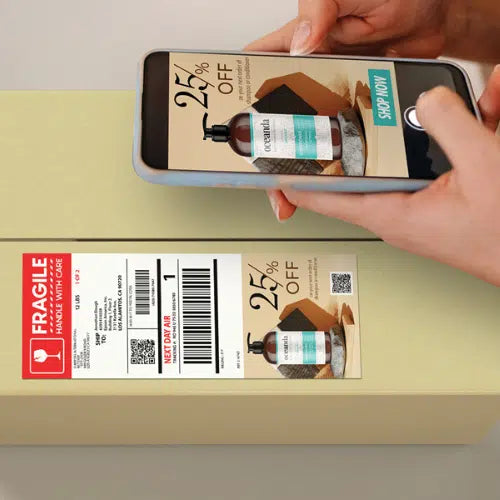
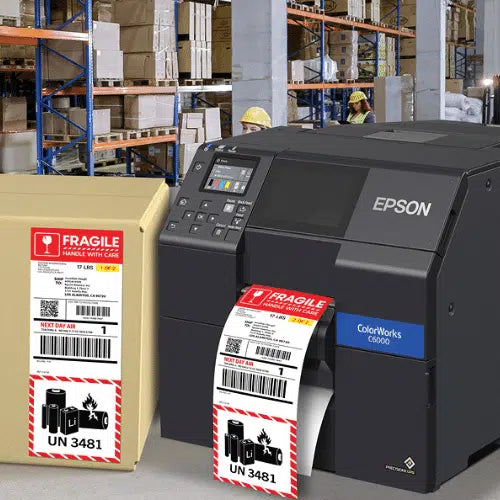
Epson Label Boost Software is designed to help businesses transform standard black-and-white shipping labels into full-color communication and marketing tools when paired with supported Epson ColorWorks printers. Built for Windows-based workflows, Label Boost lets businesses add dynamic promotional content, location-based messaging, date-based campaigns, handling notices, QR codes, and other variable elements at the final stage before printing, helping improve customer engagement, reduce the need for separate secondary labels, and create a more efficient shipping label process.
Add full-color messaging to shipping labels at print time
Built for supported Epson ColorWorks printer environments
Helps reduce separate inserts and secondary label handling
Overview
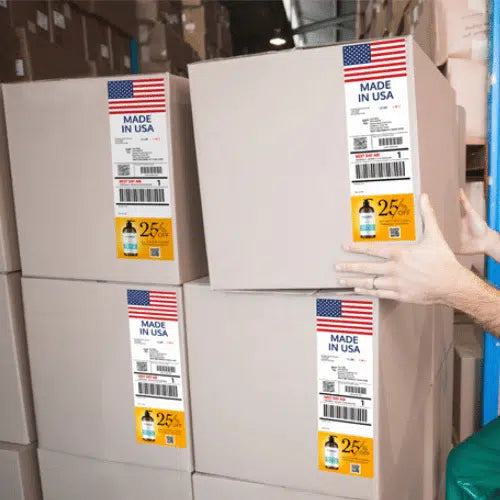
Label Boost is built for businesses that want to turn shipping labels into a more useful part of the customer and operational workflow. Instead of using a plain monochrome label only for carrier and destination data, this software allows businesses to add dynamic color content such as coupons, advertisements, cross-promotions, rush notices, handling instructions, location-specific messaging, and seasonal or date-triggered campaigns.
The value of this software is not just visual. It also helps support a more efficient workflow by reducing the need for separate printed inserts, preprinted secondary labels, or manual add-ons after label creation. Because Label Boost works at the final stage before printing, it can fit into shipping environments that want to preserve their existing process while adding more marketing value and clearer shipment communication.
Technical Specifications
Core software and workflow details for reviewing fit within your shipping label operation.
| Specification | Details |
|---|---|
| Product Type | Shipping Label Customization Software |
| Model | SW-LB001 |
| Brand | Epson |
| Software Function | Adds dynamic full-color content to shipping labels |
| Supported Printer Family | Epson ColorWorks |
| Compatible Printer Series | ColorWorks C4000, C6000, and C6500 Series |
| Operating Environment | Compatible PC / Windows-based workflow |
| Integration Style | Applies changes at the final stage before printing |
| Dynamic Content Options | Date-based, location-based, phrase-based, promotional, and informational content |
| Workflow Support | Designed to work alongside existing shipping label processes |
| Labeling Ecosystem Compatibility | ZPL-driven workflows, BarTender, and Loftware environments |
| Trial Availability | 30-day free trial available |
| Fee Structure | No recurring software fees |
Compatibility
Built for supported Epson ColorWorks environments where shipping labels can be enhanced with variable full-color content.
Label Boost is designed for businesses using supported Epson ColorWorks printers in a Windows-based workflow. It is commonly positioned for operations that want to keep their main shipping label creation process in place while adding color-based messaging, secondary information, or promotional content at the final print stage.
This software is a strong fit for operations using compatible ColorWorks hardware such as the C4000, C6000, and C6500 series. Before rollout, it is important to confirm your printer model, PC environment, and shipping software workflow so the solution aligns properly with your existing process and label output requirements.
What is Epson Label Boost Software commonly used for?
A shipping-label enhancement tool for marketing visibility, operational clarity, and smarter fulfillment communication.
Common applications
- Adding promotions and coupons to shipping labels
- Printing date-based campaign messaging
- Applying location-based regulatory or destination-specific content
- Highlighting urgency such as expedited or rush delivery
- Adding QR codes and cross-promotional messaging
- Replacing separate secondary labels or inserts in some workflows
- Improving shipping clarity for warehouse and fulfillment teams
- Enhancing branded unboxing and customer engagement touchpoints
Workflow overview
Label Boost is especially valuable for e-commerce, retail fulfillment, manufacturing, and warehouse shipping environments where every outbound package is also a customer touchpoint. Instead of leaving shipping labels as plain carrier output, businesses can use that print area to communicate promotions, handling priorities, regulatory information, or location-aware instructions.
This approach can support both marketing and operations at the same time. For businesses exploring broader shipping and fulfillment label workflows, see our E-Commerce & Retail Fulfillment Labels page and Epson Label Printers collection.
Why does color on shipping labels matter?
Shipping labels are one of the few guaranteed printed touchpoints that reach every outbound order. Adding color can help businesses call attention to promotions, improve internal shipment handling, highlight urgent delivery requirements, and create a more branded customer experience without changing the core shipping workflow more than necessary.
ForeFront advantage
- Epson workflow support for printer and software planning
- B2B guidance for fulfillment, shipping, and labeling operations
- Hardware alignment support across compatible ColorWorks printers
- Consultative help for businesses modernizing shipping label processes
Tips for getting the most from Label Boost
Practical guidance for stronger rollout, cleaner label communication, and better operational impact.
- Start with one or two high-impact content types such as rush shipment alerts, promotional offers, or QR codes before expanding the workflow.
- Keep color content visually organized so shipping-critical information remains clear and easy to read.
- Use location-based or date-based logic where it adds operational or marketing value rather than printing the same message on every label.
- Confirm your supported Epson ColorWorks printer and PC environment before deployment.
- Review whether some secondary labels, coupons, or inserts can be consolidated into the label design to improve workflow efficiency.
Frequently Asked Questions
Clear answers for businesses evaluating shipping-label software and ColorWorks integration.
What does Epson Label Boost Software do?
Label Boost allows businesses to add dynamic full-color content to shipping labels, including promotions, QR codes, handling instructions, urgency messages, and other variable information at the final stage before printing.
Which Epson printers work with Label Boost?
Label Boost is designed for supported Epson ColorWorks printers, including the C4000, C6000, and C6500 series.
Can this software work with an existing shipping label process?
Yes. One of the key advantages of Label Boost is that it is designed to fit into the workflow near the final print stage, helping businesses preserve most of their existing shipping-label process while adding dynamic content.
What kinds of content can be added to labels?
Businesses can use Label Boost to add promotions, targeted ads, QR codes, location-based messaging, date-based campaigns, regulatory notes, handling instructions, and urgency phrases such as expedited or rush delivery.
What does model SW-LB001 refer to?
SW-LB001 is the Epson model designation for Label Boost Software in the ColorWorks shipping-label software lineup.
Is there a trial available for Label Boost?
Yes. Epson offers a 30-day free trial, which can help businesses evaluate fit before fully committing to the workflow.
Need help pairing Label Boost with the right Epson ColorWorks setup?
Tell us about your current shipping workflow, printer model, and label goals, and we’ll help you determine the right ColorWorks and software direction for your operation.
Related Products
- $688.00 CAD
- $688.00 CAD
- Unit price
- per
- $688.00 CAD
- $688.00 CAD
- Unit price
- per
- $688.00 CAD
- $688.00 CAD
- Unit price
- per
- $688.00 CAD
- $688.00 CAD
- Unit price
- per
- $688.00 CAD
- $688.00 CAD
- Unit price
- per
- $688.00 CAD
- $688.00 CAD
- Unit price
- per
- $688.00 CAD
- $688.00 CAD
- Unit price
- per
- $688.00 CAD
- $688.00 CAD
- Unit price
- per
- $688.00 CAD
- $688.00 CAD
- Unit price
- per
- $688.00 CAD
- $688.00 CAD
- Unit price
- per


