





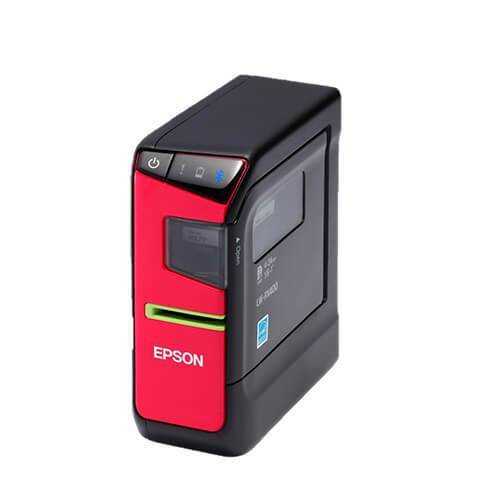
Epson LabelWorks LW-PX400 Industrial Label Printer, 180 dpi
- $259.00 CAD
- $259.00 CAD
- Unit price
- per


Epson LabelWorks LW-PX400 Portable Bluetooth Industrial Label Printer
The Epson LabelWorks LW-PX400 is a compact, flexible portable industrial label printer designed for businesses that need on-the-go printing with the added convenience of Bluetooth wireless connectivity. Built for mobile labeling, barcode creation, general identification work, and fast-paced operational environments, the LW-PX400 combines portability, automatic cutting, app-based label creation, and PC-connected workflow options to help users print and apply labels more efficiently across warehouse, maintenance, field service, and industrial identification tasks.
Bluetooth support helps users print from compatible iOS and Android devices in the field
Automatic cutting and higher print speed support better day-to-day time-efficiency
PC import features and app support add more control for structured industrial labeling
Overview
The Epson LabelWorks LW-PX400 is built for users who need a compact labeling system that can move easily between work areas while still offering more workflow flexibility than a basic handheld label maker. Its portable form factor makes it well suited to warehouses, maintenance departments, field technicians, facilities teams, installers, and operations staff who need to print labels where the job is happening instead of walking back to a fixed desktop station. In business environments where speed and organization matter, that portability can improve productivity and help users label assets, locations, and equipment more accurately at the point of use.
One of the strongest advantages of the LW-PX400 is its mix of wireless and PC-connected workflow options. The printer includes Bluetooth connectivity for use with compatible iOS and Android mobile devices, which is valuable for teams that want to create labels on the spot from a phone or tablet. It also supports importing graphics and Excel data from a PC, giving buyers a more structured path for batch-style identification work, organized label data, and layouts that may need more than a simple keypad-based input method.
The LW-PX400 is also compatible with the iLabel App and Datacom App, which expands how users create and edit labels. For many business buyers, that matters because label printing is not just about putting text on tape. It is about building repeatable identification systems that may involve data-driven content, symbols, graphics, cable information, asset references, or mobile editing in the field. The support for apps and PC-based tools helps position this model as a flexible operational printer rather than a basic consumer device.
From a performance standpoint, the printer can output at speeds of 15mm per second and up to 180 dpi resolution based on the supplied information. That higher print speed gives the LW-PX400 a time-efficiency advantage for mobile identification work, while the built-in automatic cutter helps separate labels cleanly after printing. In real workflows, that combination supports faster printing, quicker finishing, and more efficient label handling during repeated tasks.
For buyers searching terms like portable Bluetooth label printer, Epson LW-PX400, wireless industrial label printer, mobile barcode label printer, or PX-series label printer with automatic cutter, this product supports a clear commercial intent. It is designed for identification, organization, and operational labeling rather than consumer craft use or full-color packaging. It serves businesses that need mobility, structured input options, and better time-efficiency in day-to-day industrial labeling work.
Technical Specifications
Core printer, connectivity, and software details for buyers comparing portable industrial labeling systems with wireless and data-enabled workflow features.
| Specification | Details |
|---|---|
| Product Type | Portable Bluetooth Industrial Label Printer |
| SKU | LW-PX400 |
| Printer Model | Epson LabelWorks LW-PX400 |
| Printer Family | Epson LabelWorks PX-Series |
| Print Speed | 15mm per second |
| Print Resolution | Up to 180 dpi |
| Cutter Type | Automatic cutter |
| Connectivity | Bluetooth wireless connectivity |
| Mobile Device Support | Compatible with iOS and Android devices |
| Software Included | Label Editor Software |
| App Compatibility | iLabel App and Datacom App |
| PC Workflow Features | Import graphics and Excel data from a PC |
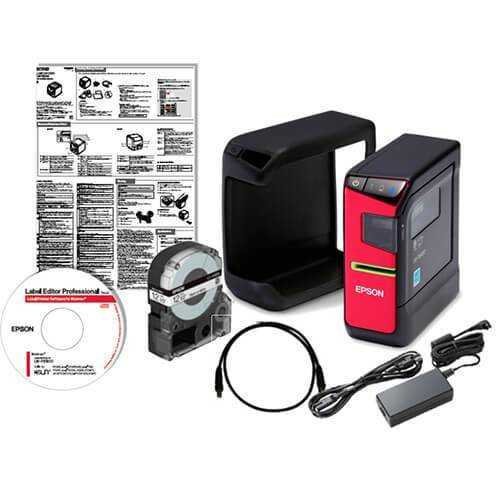
| Included Accessories | AC adapter, 1 tape cartridge (212BWPX), USB cable, drop-guard rubber sleeve, owner's manual |
| Warranty | Lifetime Warranty |
Compatibility
Built to support Epson PX-series tape workflows with the added convenience of Bluetooth, app-based editing, and PC-connected label creation.
The LW-PX400 is part of the Epson LabelWorks PX-Series, which means compatibility should be considered in two ways: first through the appropriate PX tape supply ecosystem, and second through the workflow tools that users want to rely on for label creation. This printer is especially attractive to buyers who want a portable device but do not want to give up the convenience of using a phone, tablet, or PC as part of their labeling process.
Based on the supplied information, the LW-PX400 includes Bluetooth connectivity to connect wirelessly to compatible iOS and Android mobile devices. That makes it useful for teams that want more flexible field-based printing without being physically tethered to a computer. At the same time, the printer also supports importing graphics and Excel from a PC, which gives operations teams, technicians, and administrators another path for structured label creation when mobile input alone is not enough.
The printer’s compatibility with the iLabel App and Datacom App adds more value for users who need to create and edit labels through software tools instead of relying only on manual on-device entry. In a B2B environment, that can be important for cable identification, barcode work, organized data-based labeling, asset tracking tasks, and recurring internal identification programs where consistency matters. The app and PC workflow support make the LW-PX400 more useful for businesses that want a portable printer with better process flexibility.
Supply compatibility matters just as much as device features. Buyers adopting the LW-PX400 should plan around the correct tape supplies for their ongoing application and reordering needs. That is why ForeFront supports the printer through the LW-PX400 tape collection, helping customers build a repeatable supply path for long-term business use.
What is the Epson LabelWorks LW-PX400 commonly used for?
A flexible portable labeling solution for mobile barcode creation, identification work, and app-connected industrial label printing.
Common applications
- Mobile barcode label printing for warehouse and operational identification
- General identification labels for equipment, storage, shelving, and internal organization
- On-site industrial labeling by technicians, installers, and maintenance staff
- Field-based labeling workflows that benefit from Bluetooth mobile printing
- Data-driven label creation using imported Excel information from a PC
- Graphic-supported identification where symbols or imported visual elements are useful
- Operational labeling programs requiring app-based creation and editing
- Portable identification work across service vehicles, facilities, and job sites
- Repeat internal labeling where automatic cutting helps improve pace and consistency
- Business environments that need a compact labeling platform with flexible input methods
Product and workflow overview
The Epson LabelWorks LW-PX400 is best suited to users who want the benefits of a portable industrial label printer without being limited to one narrow method of creating labels. In practical terms, that means it can work well for mobile users printing from compatible smartphones or tablets, while also supporting more structured workflows that involve PC imports, graphics, and Excel-based data. This combination can make the printer appealing to teams that need both portability and organized label setup across changing applications.
Its 15mm per second print speed also gives it a stronger throughput position than slower handheld models when repeated label output is part of the work. In fast-moving warehouse, field service, maintenance, or compliance environments, that speed gain can help reduce waiting time and keep label production moving. The built-in automatic cutter adds another efficiency advantage by separating labels cleanly after printing, which improves handling and helps users move more quickly from printing to application.
The LW-PX400 also fits businesses that want to build a more connected labeling process. App support through the iLabel App and Datacom App helps users create and edit labels more flexibly, while the included Label Editor Software and USB cable provide a more traditional PC-connected workflow option when needed. That mix of tools gives buyers a broader range of operating styles than a basic standalone handheld device.
For ongoing supply support, businesses can source compatible media through ForeFront’s LW-PX400 tape collection. If your business is looking for product packaging or full-color printed labels instead of industrial identification media, you may also want to explore our color label printers or ForeFront’s product label printing service. The LW-PX400 is better aligned to internal identification, operational marking, and portable tape-based labeling workflows.
Why wireless and software flexibility matter
Many labeling tasks no longer happen in a single fixed location or follow one rigid process. Teams may need to print labels directly from a phone while moving through a warehouse, then switch to a PC-driven workflow for more structured data-based jobs. The LW-PX400 helps support that reality by giving users multiple ways to create labels rather than forcing them into one operating style.
This flexibility can be especially valuable for businesses that manage a mix of technicians, warehouse users, operations coordinators, and administrative staff. Mobile app support helps field users print quickly, while Excel and graphics import from a PC support more organized label setup for repeating tasks. That range can improve adoption across teams because the printer works with different user preferences and different kinds of operational labeling demands.
The included accessories also support business readiness. The drop-guard rubber sleeve helps protect the unit in active work environments, while the included starter tape, USB cable, software, and AC adapter make the printer easier to put into service right away. For many B2B buyers, that kind of practical readiness matters just as much as the core print specifications.
ForeFront advantage
- Industrial labeling expertise for business users comparing mobile and connected printer workflows
- Supply continuity through compatible Epson LW-PX400 tapes for repeat operational use
- Commercial-ready support for warehouse, field, maintenance, and identification applications
- Canada-focused service for businesses standardizing labeling programs across teams
- Broader label ecosystem including industrial printers, tape supplies, color printers, and label services
- Repeat-order convenience for companies building long-term identification and compliance workflows
Tips for getting the most from the LW-PX400
Operational guidance for better mobility, cleaner label handling, and more efficient use of the printer’s wireless and software features.
- Use Bluetooth with compatible iOS or Android devices when fast mobile printing is the priority in the field or on the warehouse floor.
- Use PC import features for graphics and Excel when labels need more structured content or recurring data-based setup.
- Take advantage of the automatic cutter to reduce handling time and keep repeated labeling tasks moving more efficiently.
- Use the included Label Editor Software when you want greater layout control than a basic handheld-only workflow can offer.
- Keep the drop-guard rubber sleeve installed in more active work environments to help protect the printer during transport and use.
- Test barcode size, layout clarity, and print readability before rolling labels out across larger identification programs.
- Standardize label templates where possible so repeat jobs are easier to reproduce across teams and locations.
- Keep the USB cable and AC adapter available for situations where a wired PC workflow is more practical than mobile printing.
- Source compatible tapes through a consistent supply channel so your team avoids interruptions and mismatched media purchases.
- Align the printer with internal identification, compliance, and operational labeling tasks instead of product packaging workflows.
Frequently Asked Questions
Helpful answers for buyers evaluating the Epson LabelWorks LW-PX400 for portable wireless industrial labeling workflows.
What kind of printer is the Epson LabelWorks LW-PX400?
The Epson LabelWorks LW-PX400 is a portable industrial label printer designed for on-the-go business labeling with Bluetooth connectivity, automatic cutting, and software-assisted label creation.
Does the LW-PX400 support Bluetooth printing?
Yes. Based on the supplied information, the printer includes Bluetooth features so it can connect wirelessly to compatible iOS and Android mobile devices.
Can I import graphics or Excel data into the LW-PX400 workflow?
Yes. The supplied product details state that the LW-PX400 can import graphics and Excel from a PC device, which can help users create more structured and data-driven labels.
What apps work with the Epson LW-PX400?
The printer is compatible with the iLabel App and Datacom App, giving users additional options for creating and editing labels beyond basic on-device input.
What print speed and resolution does this model offer?
According to the supplied information, the LW-PX400 can print at speeds of 15mm per second and up to 180 dpi resolution.
Why is the automatic cutter useful on the LW-PX400?
The built-in automatic cutter helps separate labels after printing, which can improve time-efficiency and support smoother workflow handling during repeated labeling tasks.
What is included with the Epson LW-PX400 purchase option?
The package includes the Epson LW-PX400 label printer, Label Editor Software, AC adapter, 1 tape cartridge (212BWPX), USB cable, drop-guard rubber sleeve, owner’s manual, and a lifetime warranty.
What does SKU LW-PX400 refer to?
SKU LW-PX400 identifies this portable Epson LabelWorks printer model with Bluetooth connectivity, automatic cutting, software support, and business-focused mobile labeling features.
Where can I buy compatible supplies for the LW-PX400?
ForeFront offers compatible media through the Epson LW-PX400 tapes collection, which helps businesses maintain ongoing supply for repeat identification work.
Is the LW-PX400 meant for packaging labels or industrial identification?
The LW-PX400 is better aligned to industrial identification, barcode labeling, compliance workflows, and general operational marking rather than full-color retail packaging label production.
Can ForeFront help me plan the right tape setup for this printer?
Yes. If you need help choosing compatible tapes or building a more consistent PX-series labeling workflow, ForeFront can help you match the LW-PX400 to the right supply path for your business.
Need help building the right mobile labeling setup for the LW-PX400?
Tell ForeFront whether your workflow depends on Bluetooth mobile printing, PC-based label data, barcode labeling, or general industrial identification, and we’ll help you match the right tape supply strategy to your printer.
Related Products
- $259.00 CAD
- $259.00 CAD
- Unit price
- per
- $259.00 CAD
- $259.00 CAD
- Unit price
- per
- $259.00 CAD
- $259.00 CAD
- Unit price
- per
- $259.00 CAD
- $259.00 CAD
- Unit price
- per
- $259.00 CAD
- $259.00 CAD
- Unit price
- per
- $259.00 CAD
- $259.00 CAD
- Unit price
- per
- $259.00 CAD
- $259.00 CAD
- Unit price
- per
- $259.00 CAD
- $259.00 CAD
- Unit price
- per
- $259.00 CAD
- $259.00 CAD
- Unit price
- per
- $259.00 CAD
- $259.00 CAD
- Unit price
- per


