





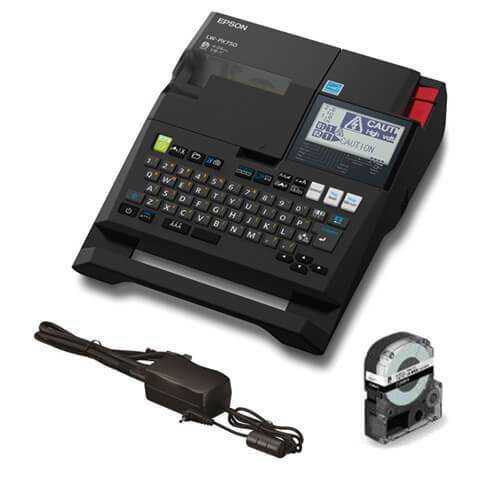
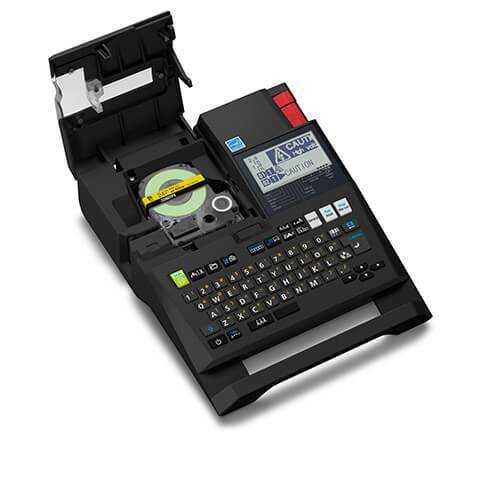
Epson LabelWorks LW-PX750 Industrial Heat Shrink Label Printer
- $407.95 CAD
$0.00 CAD- $407.95 CAD
- Unit price
- per


Epson LabelWorks LW-PX750 — Portable industrial labelling with a built-in keyboard and precision cutting
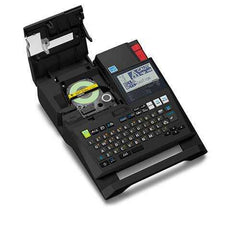
Create clear equipment, wire and workplace labels with the Epson LabelWorks LW-PX750. This portable industrial printer combines a built-in keyboard, backlit display and USB connectivity with automatic full and half cutting for efficient everyday labelling.
PX tapes for everyday and specialist jobs
Prepare individual labels or easy-to-peel strips
Design at the printer or on a computer
Overview
The LW-PX750 suits maintenance teams, electricians and facilities staff who want a keyboard-equipped printer they can carry to the job. Create labels directly on the printer, or connect by USB to use Epson Label Editor on a compatible Windows computer. Its 180 dpi thermal-transfer printing produces practical identification labels without ink or toner.
Use the keyboard for quick one-off labels and computer software for repeated formats, graphics and spreadsheet-based work. Pick and Print can hold a printed label until you remove it before the next label is produced, helping you keep sequential jobs in order.
Quick Product Snapshot
- 180 dpi thermal-transfer printing
- Compatible PX tapes up to 24 mm
- Up to 30 mm/sec
- USB connection to a compatible Windows computer
- AC adapter or six AA batteries (batteries sold separately)
Technical Specifications
Key details for choosing the right printer and supplies.
| Specification | Details |
|---|---|
| Printer model | Epson LabelWorks LW-PX750 |
| Print technology | Thermal transfer; no ink or toner required |
| Print resolution | 180 dpi |
| Compatible tape widths | 4 mm to 24 mm (1/6" to 1") |
| Maximum print speed | Up to 30 mm/sec; media, settings and power conditions apply |
| Cutting | Automatic full and half cutting; use settings appropriate to the media |
| Connectivity | USB connection to a compatible Windows computer |
| Power | AC adapter or six AA batteries (batteries sold separately) |
| Display and controls | Backlit monochrome display and QWERTY keyboard |
| Minimum leading margin | 4 mm on standard tape; specialty media requirements vary |
| Label handling | Pick and Print label-hold function; PeelGuard corner trimmer |
Compatibility
Match the supply and software to your application.
PX tapes and connected devices
Use genuine, compatible Epson LabelWorks PX cartridges in supported widths. Choose standard tape for general identification or an appropriate specialty material for the application. Heat-shrink tubing, adhesive strength and environmental suitability must be checked for the specific supply.
The LW-PX750 connects through USB connection to a compatible Windows computer. Before purchase, check Epson’s current driver, software and app requirements for your operating system and device.
What is the LW-PX750 commonly used for?
Practical labelling for organized, identifiable workplaces.
Common Applications
- Electrical panels, terminal blocks and equipment identification
- Wire and cable marking with compatible heat-shrink supplies
- Maintenance, tools and storage locations
- Asset labels, barcodes and repeated workplace identifiers
Product and Workflow Overview
Use the keyboard for quick one-off labels and computer software for repeated formats, graphics and spreadsheet-based work. Pick and Print can hold a printed label until you remove it before the next label is produced, helping you keep sequential jobs in order.
More control over cutting and label handling
Automatic full and half cutting gives you options for separating labels or keeping a series together on the backing. The built-in PeelGuard corner trimmer rounds label corners, which can help reduce snagging at exposed edges. A short leading margin on standard tape also helps limit unused material.
The ForeFront Advantage
- Canadian source for Epson LabelWorks printers and compatible PX tapes
- Help choosing a printer, tape width and material for your application
- Support matching supplies to equipment and workplace labelling needs
Printing Tips
Prepare, test and apply for a clear result.
Get the most from your LW-PX750
- Confirm the cartridge width and material before creating your layout.
- Use a short test print to check text size, barcode readability and label length.
- Clean and dry the surface before applying adhesive labels; follow the tape’s application guidance.
- Choose cutting settings appropriate to the installed supply. Do not assume every specialty material supports every cutting mode.
- For heat-shrink tubing, confirm the cable diameter, shrink ratio and application temperature for the selected supply.
- Keep the printhead and cutter maintained according to Epson’s instructions.
Frequently Asked Questions
Answers about the Epson LabelWorks LW-PX750.
What is the Epson LW-PX750 used for?
The LW-PX750 is a thermal-transfer industrial label printer for equipment, assets, workplace identification and wire or cable marking with compatible supplies. Select the tape material to suit the surface and working environment.
What tape widths does it support?
It supports compatible PX tape cartridges from 4 mm up to 24 mm. Choose a supported cartridge and a layout that fits its printable area. Tape width is different from the maximum printed image width.
Can it print heat-shrink tubing and specialty tapes?
Yes, with compatible Epson PX supplies. Options include heat-shrink tubing and specialty label materials. Heat-shrink sizes have their own compatibility limits and do not use the printer’s maximum tape-width figure; confirm the exact supply before ordering.
What are its resolution and printing speed?
The LW-PX750 prints at 180 dpi with a maximum speed of 30 mm/sec. Maximum speed depends on the media, settings and operating conditions; use AC power for rated maximum-speed jobs.
Does it automatically cut labels?
Yes. Automatic full and half cutting lets you separate finished labels or keep a sequence on its backing. Cutting availability and suitable settings depend on the selected tape material.
Does the LW-PX750 have Wi-Fi?
No. This model connects to a computer by USB. You can also create labels directly using its built-in keyboard and display.
Can it import spreadsheet data?
Epson Label Editor for compatible Windows computers supports spreadsheet-based label creation and graphics. Check Epson’s current software requirements before installing.
What is the difference between the LW-PX750 and LW-PX750PCD packages?
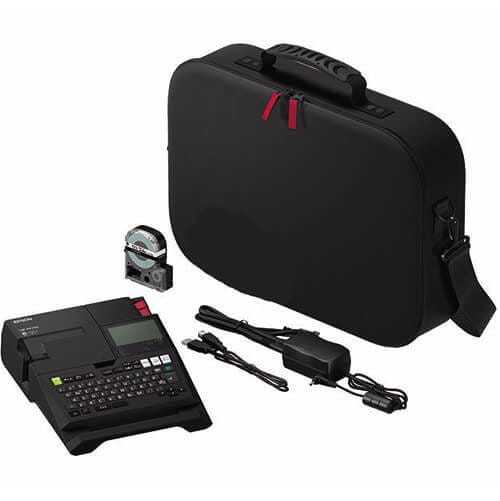
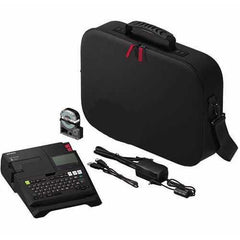
Both use the same printer. The PCD package adds the USB cable and semi-rigid carrying case to the standard printer, AC adapter and starter tape. Check the selected package before ordering.
What comes with the printer?
Choose LW-PX750 for the standard package with printer, AC adapter, starter black-on-white tape cartridge and documentation. The LW-PX750PCD package adds a USB cable and semi-rigid carrying case, with Epson Label Editor available for download. AA batteries are not included.
Where can I find compatible tapes?
Use the compatible PX tapes link on this page to browse the matching ForeFront collection. Check the cartridge’s material, width, colour combination and intended use before ordering. Contact us if you need help matching a supply.
Is there a manufacturer warranty?
Epson LabelWorks offers a manufacturer lifetime warranty for printers in Canada and the United States, subject to its terms. Register your printer after purchase and review Epson’s current warranty conditions.
Need help choosing the right printer or tape?
ForeFront can help you match the LW-PX750 and compatible PX supplies to your labelling application.


