





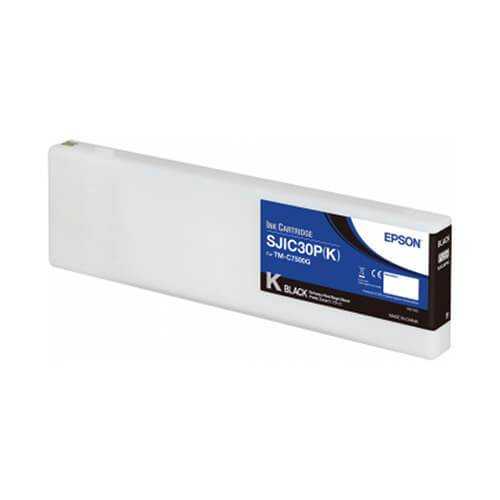
Epson TM-C7500G Black Ink Cartridge, SJIC30P(K)
- $305.00 CAD
- $305.00 CAD
- Unit price
- per


Epson TM-C7500G SJIC30P(K) High Yield Black Ink Cartridge - Part #C33S020635
Epson C33S020635 is the genuine SJIC30P(K) high yield black ink cartridge for Epson ColorWorks TM-C7500G and TM-C7500GE gloss label printers. This cartridge is part of the SJIC30P UltraChrome DL pigment ink system used by the C7500G gloss platform, designed for durable black density on gloss label media. In production, the black channel carries small text, barcodes, ingredient panels, and compliance content where edge definition and smear resistance are non negotiable. Pigment chemistry helps reduce smudging and improves scuff resistance when paired with compatible labels and correct media settings. This cartridge is not compatible with Epson TM-C7500 matte units that use SJIC26P cartridges, and it will not fit other ColorWorks series that use different ink families.
Key Highlights
- Pigment ink cartridge in the SJIC30P UltraChrome DL system
- Compatible with TM-C7500G and TM-C7500GE gloss printers only
- High yield black channel for crisp text, barcodes, and compliance content
- Not compatible with TM-C7500 matte models using SJIC26P inks
Pigment inkjet cartridge, SJIC30P UltraChrome DL system.
Best for gloss label production where barcode readability and small text clarity are critical.
Confirm G or GE model. Matte TM-C7500 uses SJIC26P inks and cannot accept SJIC30P.
Why Teams Choose SJIC30P(K)
- Barcode reliability supports dense, scannable barcode output on gloss media
- Durability intent pigment ink supports handling heavy label environments
- Inventory control replace only the black channel without buying a full set
Food and beverage, cosmetics, nutraceuticals, logistics and warehousing, industrial product ID.
Use gloss label stocks intended for the TM-C7500G platform and validate dry time and rub resistance on your actual containers.
Keep nozzles healthy and the maintenance box current to reduce cleaning cycles and wasted ink.
Choose the Correct Ink Family
- TM-C7500G and TM-C7500GE gloss printers use SJIC30P UltraChrome DL cartridges, including SJIC30P(K) C33S020635.
- TM-C7500 matte printers use SJIC26P DURABrite Ultra cartridges and are not compatible with SJIC30P.
Specifications
| Brand | Epson |
|---|---|
| Product type | Ink cartridge |
| Ink family system | SJIC30P UltraChrome DL |
| Ink code | SJIC30P(K) |
| Part number MPN | C33S020635 |
| GTIN EAN | 4988617225886 |
| Ink type | Pigment |
| Color | Black |
| Compatible printers | Epson ColorWorks TM-C7500G, TM-C7500GE |
| Not compatible with | TM-C7500 matte models using SJIC26P inks |
For gloss workflows, use matching TM-C7500G label stocks and keep the maintenance box current to maintain print quality.
Compatible Supplies
To prevent ink family mismatches, provide your printer model and whether you are running a gloss TM-C7500G or TM-C7500GE unit. If you are also ordering labels, include your label width, core size, and whether you are using gap sensing or black mark sensing.
- Gloss printer label rolls: TM-C7500G Labels
- Full ink set for matching colors: TM-C7500G Inks
- Waste ink service item: TM-C7500G Maintenance Box
FAQ
Is there a matte version of this ink?
Yes. TM-C7500 matte printers use the SJIC26P ink family. SJIC30P(K) C33S020635 is for TM-C7500G and TM-C7500GE gloss printers only.
Can I get a volume quote for recurring ink orders?
Yes. Share your monthly label volume, average coverage, and whether you run mostly photo coverage or spot color work so we can size the replenishment plan.
How do I confirm compatibility before ordering?
Check your printer model on the front panel or driver. If it reads TM-C7500G or TM-C7500GE, use SJIC30P cartridges including C33S020635.
What drives running cost per label?
Artwork coverage, label size, print speed settings, and cleaning cycles all impact ink consumption. Keeping nozzles healthy reduces wasted ink from reprints.
What else should I order with this cartridge?
Match it with TM-C7500G label stocks and keep a maintenance box available to avoid interruptions during extended runs.
Keep Your TM-C7500G Production Ready
If you are standardizing supplies for a TM-C7500G or TM-C7500GE fleet, align ink colors, label media, and maintenance boxes to reduce downtime and keep color output consistent across batches.
Related Products
- $305.00 CAD
- $305.00 CAD
- Unit price
- per
- $305.00 CAD
- $305.00 CAD
- Unit price
- per
- $305.00 CAD
- $305.00 CAD
- Unit price
- per
- $305.00 CAD
- $305.00 CAD
- Unit price
- per
- $305.00 CAD
- $305.00 CAD
- Unit price
- per
- $305.00 CAD
- $305.00 CAD
- Unit price
- per
- $305.00 CAD
- $305.00 CAD
- Unit price
- per
- $305.00 CAD
- $305.00 CAD
- Unit price
- per
- $305.00 CAD
- $305.00 CAD
- Unit price
- per
- $305.00 CAD
- $305.00 CAD
- Unit price
- per


